Loading...
Searching...
No Matches
AerodynamicObjects.Control.Actuator Class Reference
A base actuator class which is used to create any controllable components. More...
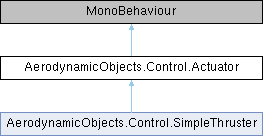
Inheritance diagram for AerodynamicObjects.Control.Actuator:
Public Member Functions | |
| virtual void | UpdateValue (float deltaTime) |
| virtual void | ApplyControlSignal (float signal) |
| float | GetScaledInput (float input) |
| Scales the input linearly such that -1 becomes the min travel of the actuator and +1 becomes the max travel. More... | |
| virtual Vector3 | Position () |
| Used for drawing the actuator handles in the unity editor More... | |
Public Attributes | |
| string | ActuatorName = "Actuator" |
| The display name for the actuator. More... | |
| float | InputValue = 0f |
| Input Value is the target provided by a control input. More... | |
| float | TargetValue = 0f |
| Target Value is the processed input value, usually clamped to be between min and max. More... | |
| float | CurrentValue = 0f |
| The current value of the controlled object. More... | |
| float | ValueRate = 10f |
| The maximum rate of change of the controlled value. More... | |
| float | MinValue = -15f |
| float | MaxValue = 15f |
Detailed Description
A base actuator class which is used to create any controllable components.
At the moment this will be overkill, however, it paves the way for more complex control systems in future updates.
Member Function Documentation
◆ ApplyControlSignal()
|
virtual |
◆ GetScaledInput()
| float AerodynamicObjects.Control.Actuator.GetScaledInput | ( | float | input | ) |
Scales the input linearly such that -1 becomes the min travel of the actuator and +1 becomes the max travel.
- Parameters
-
input Input signal to be scaled
- Returns
- Scaled input, the target travel of the actuator
◆ Position()
|
virtual |
Used for drawing the actuator handles in the unity editor
- Returns
- The position to draw the actuator's number in the scene
◆ UpdateValue()
|
virtual |
Member Data Documentation
◆ ActuatorName
| string AerodynamicObjects.Control.Actuator.ActuatorName = "Actuator" |
The display name for the actuator.
◆ CurrentValue
| float AerodynamicObjects.Control.Actuator.CurrentValue = 0f |
The current value of the controlled object.
◆ InputValue
| float AerodynamicObjects.Control.Actuator.InputValue = 0f |
Input Value is the target provided by a control input.
◆ MaxValue
| float AerodynamicObjects.Control.Actuator.MaxValue = 15f |
◆ MinValue
| float AerodynamicObjects.Control.Actuator.MinValue = -15f |
◆ TargetValue
| float AerodynamicObjects.Control.Actuator.TargetValue = 0f |
Target Value is the processed input value, usually clamped to be between min and max.
◆ ValueRate
| float AerodynamicObjects.Control.Actuator.ValueRate = 10f |
The maximum rate of change of the controlled value.
The documentation for this class was generated from the following file:
- C:/Unity/AO 2/Assets/AO/Scripts/Control/Actuator.cs